
COSG on the GPU
COSG’s scoring is a sparse matrix product followed by a per-gene penalty, which is exactly the shape a GPU is good at. One argument moves it:
cosg.cosg(adata, groupby="CellTypes", device="gpu")This page measures what that buys, because the honest answer is it depends on the size of your matrix, and below a certain size it buys nothing.
1. Requirements
pip install cupy-cuda12x # or cupy-cuda11x, matching your CUDACOSG imports CuPy only when device='gpu' is requested, so a CPU-only install
is unaffected. If CuPy is missing the call raises with the install line rather
than silently falling back — you asked for a GPU, and quietly not using one
would be worse than an error.
2. The measurement
Adult mouse cortex, 26,205 genes, 20 cell types, on one RTX A5500 (24 GB). Cell counts above 17,412 are produced by resampling cells from the same object, so the matrix grows while its statistics do not.
import timeimport cosg
for device in ("cpu", "gpu"): t0 = time.time() cosg.cosg(adata, groupby="CellTypes", key_added="cosg", mu=100, n_genes_user=50, device=device) print(device, round(time.time() - t0, 2), "s")| cells | nonzeros | CPU | GPU | speed-up | top-20 markers identical |
|---|---|---|---|---|---|
| 5,000 | 11 M | 0.30 s | 0.43 s | 0.7× | yes |
| 17,412 | 39 M | 0.87 s | 0.55 s | 1.6× | yes |
| 50,000 | 112 M | 2.91 s | 1.46 s | 2.0× | yes |
| 200,000 | 448 M | 11.75 s | 5.83 s | 2.0× | yes |
| 500,000 | 1.1 B | 28.99 s | 21.47 s | 1.4× | yes |
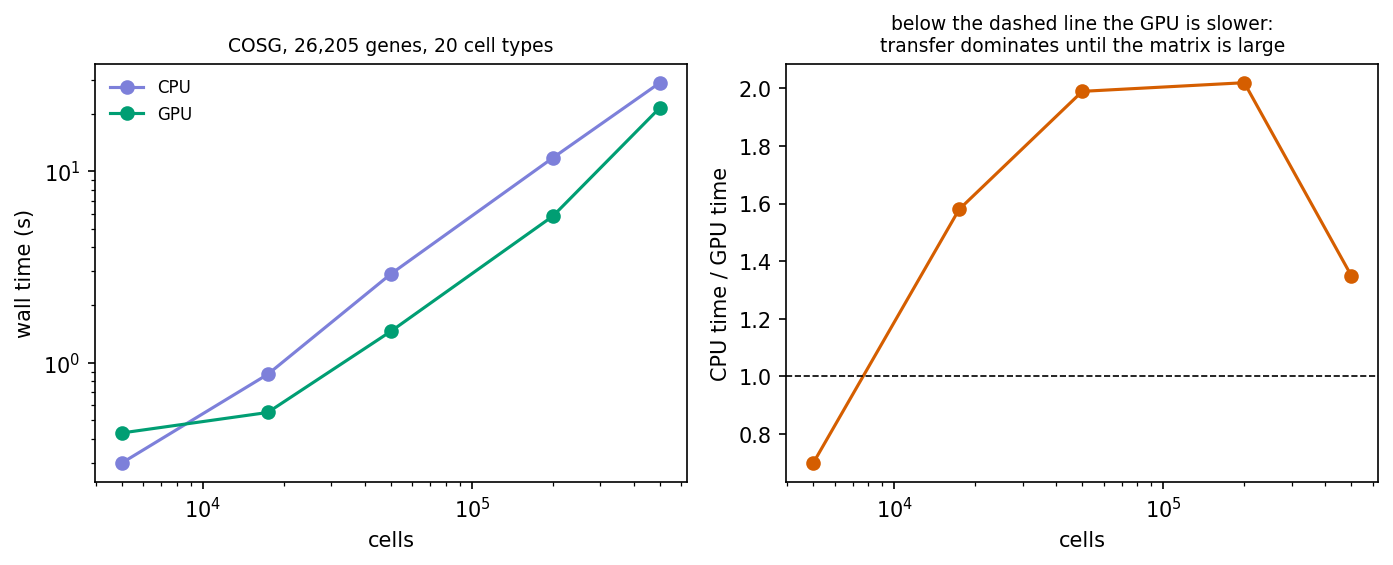
Three things this says:
- Below about 10,000 cells the GPU is slower. Moving the matrix across the bus costs more than the multiply saves. The 5,000-cell row is 0.7×, and the absolute difference is 0.13 s — neither number is worth a dependency.
- The useful range is roughly 50,000 to a few hundred thousand cells, where it is a steady 2×.
- It falls off again at 500,000 cells (1.4×), where 1.1 billion nonzeros no longer sit comfortably in 24 GB and the transfer is chunked. A larger card moves that point; the shape of the curve does not change.
The markers are identical at every size — the top-20 overlap is 1.00 throughout. The GPU path is the same arithmetic in a different place, not an approximation, so there is no accuracy question to weigh against the speed.
3. p-values on the GPU path
They work, and they are computed on the CPU:
cosg.cosg(adata, groupby="CellTypes", device="gpu", calculate_pvalues=True)"pvals" in adata.uns["cosg"]TrueThe GPU kernels take the CPU matrix as an argument rather than replacing it, so the significance block reads the same matrix on either path. That is deliberate: the saddlepoint solve is a root-find over a few tens of atoms per row, which does not suit a GPU, and it costs little enough that it does not need to — 8.0 s for the whole run including p-values on the 17,412-cell object.
4. Which knob to turn first
If COSG is the slow step in your analysis, the order worth trying is:
n_genes_user— reporting 50 markers instead of 2,000 is free.device='gpu'— a steady 2× in the range above, one argument, identical results.run_cosg_cytome— this is about memory, not speed. When the matrix does not fit, streaming is not a 2× improvement over the alternative; it is the difference between running and not.
For most objects COSG is not the slow step. On 500,000 cells it is 29 seconds on a CPU, which is usually less than the clustering that produced the labels.
Where to go next
- COSG on a cytome — the memory axis.
- COSG on spatial data — region markers on 121,767 spatial bins.
- INFOG + GDR on one million cells — the rest of the pipeline at that scale.